
23 April 2008

10 August 2007
How innovative is Leopard?
According to Apple, Mac OS X version 10.5 (codenamed "Leopard") "features 300+ innovations." However, some of those seem to be more plagiarism than innovation.
First, I invite you to look at the new "Spaces". This feature has been standard in GNOME, KDE, and Xfce for years. I even had multiple desktops on Windows XP in 2003, thanks to the nVIDIA software that came with my HP Pavilion a320n. I would normally give Apple kudos for making it look better, but that had already been taken care of by Compiz.
Examples of GNOME's default Workspaces:


Second, take a look at the "Stacks." The default GNOME Panel has a nifty applet called a drawer, which allows the user to put other applets, shotcuts, and what have you into a collapsible container. Sound familiar? However, this is one idea with which Apple was able to make significant aesthetic improvement.
Examples of the GNOME Drawer (with links to my documents, music, and photos):


Stuff that you can add to the Drawer (the Custom Application Launcher allows you to add virtually anything):

First, I invite you to look at the new "Spaces". This feature has been standard in GNOME, KDE, and Xfce for years. I even had multiple desktops on Windows XP in 2003, thanks to the nVIDIA software that came with my HP Pavilion a320n. I would normally give Apple kudos for making it look better, but that had already been taken care of by Compiz.
Examples of GNOME's default Workspaces:


Second, take a look at the "Stacks." The default GNOME Panel has a nifty applet called a drawer, which allows the user to put other applets, shotcuts, and what have you into a collapsible container. Sound familiar? However, this is one idea with which Apple was able to make significant aesthetic improvement.
Examples of the GNOME Drawer (with links to my documents, music, and photos):

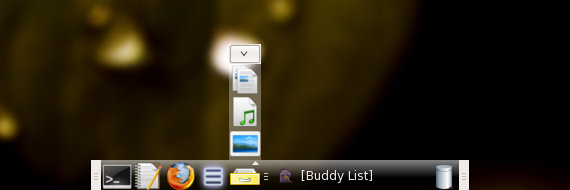
Stuff that you can add to the Drawer (the Custom Application Launcher allows you to add virtually anything):

20 June 2007

19 June 2007
Icon improvements for Ubuntu Dapper/Edgy
Figure 1: Before

Figure 2: After

Background info:
Basically, the Human icon theme is somewhat incomplete on earlier versions of Ubuntu. From time to time, it invokes various default GNOME icons (mostly in GTK icons- folders and documents appear sound). Personally, I find these icons to be ugly. I chose to replace them with the much more aesthetically-pleasing Tango GTK icons. It's actually quite simple.
1. Install the Tango icon theme
2. Download the 'iconimprov' script in this archive
3.'cd' to the directory containing the archive (probably
4. Extract the script from the archive
5. Make the script executable
6. Run the script as root
Now when you use the Human icon theme, you will have pretty Tango GTK buttons instead of the GNOME ones from 1995.
To undo this, simply re-install the default Ubuntu artwork
I've only tested the script on my computer. If for some reason it doesn't work for you, here is a list of commands that you can run manually to achieve the same effect.
Figure 2: After
Background info:
Basically, the Human icon theme is somewhat incomplete on earlier versions of Ubuntu. From time to time, it invokes various default GNOME icons (mostly in GTK icons- folders and documents appear sound). Personally, I find these icons to be ugly. I chose to replace them with the much more aesthetically-pleasing Tango GTK icons. It's actually quite simple.
1. Install the Tango icon theme
# sudo aptitude install tango-icon-theme tango-icon-theme-common
2. Download the 'iconimprov' script in this archive
3.'cd' to the directory containing the archive (probably
$ cd Desktop)
4. Extract the script from the archive
$ tar -xf iconimprov.tar.gz
5. Make the script executable
$ chmod +x iconimprov
6. Run the script as root
# sudo ./iconimprov
Now when you use the Human icon theme, you will have pretty Tango GTK buttons instead of the GNOME ones from 1995.
To undo this, simply re-install the default Ubuntu artwork
# sudo aptitude reinstall ubuntu-artwork
I've only tested the script on my computer. If for some reason it doesn't work for you, here is a list of commands that you can run manually to achieve the same effect.
14 June 2007
Desktop Environments
Earlier, I spoke of various aspects of a Linux distro, and mentioned the concept of the Desktop Environment (DE). In this post, I will give a more in-depth explanation of DE's by pointing out some of their key points. Since they are the most widely used, I'm going to focus on GNOME, KDE, and Xfce.
File Manager
Also called a file browser, this is a program that lets the user graphically browse directories and files on a computer. In Windows, the file manager is Windows Explorer, and in Mac OS X, the file manager is Finder. There are several available file managers for Linux. Choosing one that works for you is important, because this is a program that you will be using quite often.
GNOME uses Nautilus as its default file manager, KDE uses Konqueror (which is also a web browser), and XFCE uses Thunar.
The future of the file manager is really open-ended. There are some cases in which the desktop metaphor is taken to the extreme, such as BumpTop. In other cases, there are simple tweaks to the current metaphor, such as switching from a navagational metaphor to an object-oriented metaphor (see The Spatial Way).
Window Manager
A Window manager is a program that controls the appearance and behavior of windows. The buttons that you click in the corner of a window to close, minimize, and maximize the window are part of the window manager. When you resize a window, you're using a function of the window manager. In both Windows and Mac OS X, the window manager is vendor-controlled. However, with Linux, you a free to use a number of window managers, and configure them to fit your needs.
GNOME employs Metacity,while KDE employs KWin, and Xfce uses Xfwm.
Beryl and Compiz seem to be rather popular window managers.
Applications
All DE's come with different applications. For example, GNOME's text editor is Gedit, KDE's is Kwrite, and Xfce's is Mousepad. However, this isn't a big deal since it's possible to install an application in a non-native DE as long as you have the necessary libraries installed. I use some KDE apps in GNOME, such as KAlarm, Rosegarden, and Creox.
File Manager
Also called a file browser, this is a program that lets the user graphically browse directories and files on a computer. In Windows, the file manager is Windows Explorer, and in Mac OS X, the file manager is Finder. There are several available file managers for Linux. Choosing one that works for you is important, because this is a program that you will be using quite often.
GNOME uses Nautilus as its default file manager, KDE uses Konqueror (which is also a web browser), and XFCE uses Thunar.
The future of the file manager is really open-ended. There are some cases in which the desktop metaphor is taken to the extreme, such as BumpTop. In other cases, there are simple tweaks to the current metaphor, such as switching from a navagational metaphor to an object-oriented metaphor (see The Spatial Way).
Window Manager
A Window manager is a program that controls the appearance and behavior of windows. The buttons that you click in the corner of a window to close, minimize, and maximize the window are part of the window manager. When you resize a window, you're using a function of the window manager. In both Windows and Mac OS X, the window manager is vendor-controlled. However, with Linux, you a free to use a number of window managers, and configure them to fit your needs.
GNOME employs Metacity,while KDE employs KWin, and Xfce uses Xfwm.
Beryl and Compiz seem to be rather popular window managers.
Applications
All DE's come with different applications. For example, GNOME's text editor is Gedit, KDE's is Kwrite, and Xfce's is Mousepad. However, this isn't a big deal since it's possible to install an application in a non-native DE as long as you have the necessary libraries installed. I use some KDE apps in GNOME, such as KAlarm, Rosegarden, and Creox.
10 June 2007
The Best Firefox Add-ons of All Time
Add-ons that you need to install right now:
-Adblock Plus
I hate advertisements. You do too.
-Download Statusbar
The default "Downlods" pop-up window is annoying. This add-on a convenient solution.
-Fasterfox
Fasterfox lets you get the most out of a high-speed connection.
-Foxmarks Bookmark Synchronizer
This is an absolute MUST-HAVE for anyone who uses FF on multiple computers.
-Tab Mix Plus
I've been using this as long as I've been using FF. Customization at its best.
-Organize Status Bar
Tired of add-ons adding useless icons to your status bar? Not anymore.
-Menu Editor
Change your context (right-click) menu. Another example of true customization.
Add-ons that you should check out in the near future:
-Tiny Menu
Puts File, Edit, etc. under one menu.
-NoScript
If you use Windows, consider this one in the top group.
-FireFTP
Great, unless you prefer an external FTP client.
-Foxytunes
Allows you to control iTunes, Windows Media Player, etc. from inside FF.
-Mouse Gestures
Perform various tasks by drawing shapes with your mouse.
-Forecastfox
For when you're too lazy to type in "weather.com".
-Cooliris Previews
Mouse-over previews of search results on Google and so forth.
-Colorful Tabs
This add-on is surprising helpful.
-Chatzilla
An IRC client for FF. How nerdy can you get with one program?
-Flashblock
Turns flash animations into a "play" button, allowing you to choose whether to view them.
-Copy Link Name
More handy than one might think.
-Sage
The best RSS reader for FF.
-Unofficial Myspace Toolbar
Only helpful if you use Myspace.
Awesome Themes:
Blue Ice
Phoenity Firefox
Ubuntu Human Theme
Tango
RedShift V2 Beta
iFox Smooth
-Adblock Plus
I hate advertisements. You do too.
-Download Statusbar
The default "Downlods" pop-up window is annoying. This add-on a convenient solution.
-Fasterfox
Fasterfox lets you get the most out of a high-speed connection.
-Foxmarks Bookmark Synchronizer
This is an absolute MUST-HAVE for anyone who uses FF on multiple computers.
-Tab Mix Plus
I've been using this as long as I've been using FF. Customization at its best.
-Organize Status Bar
Tired of add-ons adding useless icons to your status bar? Not anymore.
-Menu Editor
Change your context (right-click) menu. Another example of true customization.
Add-ons that you should check out in the near future:
-Tiny Menu
Puts File, Edit, etc. under one menu.
-NoScript
If you use Windows, consider this one in the top group.
-FireFTP
Great, unless you prefer an external FTP client.
-Foxytunes
Allows you to control iTunes, Windows Media Player, etc. from inside FF.
-Mouse Gestures
Perform various tasks by drawing shapes with your mouse.
-Forecastfox
For when you're too lazy to type in "weather.com".
-Cooliris Previews
Mouse-over previews of search results on Google and so forth.
-Colorful Tabs
This add-on is surprising helpful.
-Chatzilla
An IRC client for FF. How nerdy can you get with one program?
-Flashblock
Turns flash animations into a "play" button, allowing you to choose whether to view them.
-Copy Link Name
More handy than one might think.
-Sage
The best RSS reader for FF.
-Unofficial Myspace Toolbar
Only helpful if you use Myspace.
Awesome Themes:
Blue Ice
Phoenity Firefox
Ubuntu Human Theme
Tango
RedShift V2 Beta
iFox Smooth
09 June 2007
Why I hate Apple Software
On a Windows machine, iTunes is a step above spyware. Let's look into it.
First of all, observe the system requirements taken directly from "apple.com":
Quicktime? The only realistic use for the program is to play ".mov" files, which are at the bottom of the barrel in terms of coding popularity. I know that Quicktime plays other files too, but 99% of Windows users are going to use Windows Media Player for pretty much all their video playing needs, because Quicktime sucks.
After doing some reading, I found out that iTunes actually uses Quicktime to play the media files. This implies that iTunes is basically an organizing front-end to Quicktime, and not a media player in its own right. So why am I downloading it? In short, there is no real answer to that, which explains why iTunes sucks.
Quicktime also makes a FF plugin- which is the most annoying one of them all. If I want to play a media file in a browser, it better be short and come with an in-page, HTML-based GUI. otherwise, I'll download it and enjoy it whenever I please.
Let's just say that you decide to install Quicktime+iTunes anyway because you are an idiot. That's not all you're getting. But wait- download now, and we'll throw in FREE applications that run suspicious background processes AND hundreds of megabytes in language support files that you will never use at NO notice to you whatsoever! I'm not even using iTunes or Quicktime right now, but let's take a look at my Task Manager:
Not only are they installed, but set to run automatically at startup. "Nice" programs just put a shortcut in the StartUp folder that you can delete in about 3 seconds if you don't want it there. That's not good enough for the greedy bastards at Apple. They have to write keys in scattered locations throughout the Windows Registry to instruct these programs to run at start up. Trust me, it's a pain in the ass to disable them. The least they could do is provide a start-up option in iTunes and Quicktime, if not in the installation.
So, you're probably thinking these must be important processes that perform important tasks. Wrong. Want to know what iTunesHelper.exe does? Not dick. What about iPodService.exe? I don't have an iPod, so I don't care- and I definitely don't want it on my computer. Well, what about qttask.exe? It's virtually a spyware program that makes sure you don't have the balls to try to play ".mov" files with other software. Have you ever seen that box that says something like: "Some files that should be associated with Quicktime are no longer associated with Quicktime. Blah blah, we own your computer." That's what qttask.exe does.
Well, if they don't really do anything, you can probably just delete them, right? Way wrong. I rummaged through the two hundred folders that Apple added to my Program Files, and deleted the binaries for those processes. Guess what. Apple reinstalled them automatically, without warning. the only way I've found to get rid of them is to open the ".exe" and ".dll" files with Notepad, erase all the code, and save the blank files. That way, Big Brother thinks all of his minions are still in place, but they're just blank decoys. On an unrelated note, I've used this strategy against a number of virulent spyware infections.
I actually read the Apple software agreement. I agreed not to install iTunes on life support machines or nuclear weapons systems (because we all know that those use Windows XP), but I never once agreed to let apple take over my computer. If I wanted that, I would have just bought a Mac in the first place.
I would expect this brand of corporate bullshit from Microsoft, or even AOL, but not Apple.
First of all, observe the system requirements taken directly from "apple.com":
Windows Requirements
* Windows 2000 Service Pack 4 or later or Windows XP
* 500 MHz Pentium class processor or better
* QuickTime 7.1.5 (included)
* 256MB RAM
* Supported CD-R or DVD-R drive to burn CDs
* Broadband Internet connection (DSL/Cable/LAN) for buying and streaming music
Quicktime? The only realistic use for the program is to play ".mov" files, which are at the bottom of the barrel in terms of coding popularity. I know that Quicktime plays other files too, but 99% of Windows users are going to use Windows Media Player for pretty much all their video playing needs, because Quicktime sucks.
After doing some reading, I found out that iTunes actually uses Quicktime to play the media files. This implies that iTunes is basically an organizing front-end to Quicktime, and not a media player in its own right. So why am I downloading it? In short, there is no real answer to that, which explains why iTunes sucks.
Quicktime also makes a FF plugin- which is the most annoying one of them all. If I want to play a media file in a browser, it better be short and come with an in-page, HTML-based GUI. otherwise, I'll download it and enjoy it whenever I please.
Let's just say that you decide to install Quicktime+iTunes anyway because you are an idiot. That's not all you're getting. But wait- download now, and we'll throw in FREE applications that run suspicious background processes AND hundreds of megabytes in language support files that you will never use at NO notice to you whatsoever! I'm not even using iTunes or Quicktime right now, but let's take a look at my Task Manager:
iPodService.exe 3,892 KB
iTunesHelper.exe 3,772 KB
qttask.exe 1,232 KB
Not only are they installed, but set to run automatically at startup. "Nice" programs just put a shortcut in the StartUp folder that you can delete in about 3 seconds if you don't want it there. That's not good enough for the greedy bastards at Apple. They have to write keys in scattered locations throughout the Windows Registry to instruct these programs to run at start up. Trust me, it's a pain in the ass to disable them. The least they could do is provide a start-up option in iTunes and Quicktime, if not in the installation.
So, you're probably thinking these must be important processes that perform important tasks. Wrong. Want to know what iTunesHelper.exe does? Not dick. What about iPodService.exe? I don't have an iPod, so I don't care- and I definitely don't want it on my computer. Well, what about qttask.exe? It's virtually a spyware program that makes sure you don't have the balls to try to play ".mov" files with other software. Have you ever seen that box that says something like: "Some files that should be associated with Quicktime are no longer associated with Quicktime. Blah blah, we own your computer." That's what qttask.exe does.
Well, if they don't really do anything, you can probably just delete them, right? Way wrong. I rummaged through the two hundred folders that Apple added to my Program Files, and deleted the binaries for those processes. Guess what. Apple reinstalled them automatically, without warning. the only way I've found to get rid of them is to open the ".exe" and ".dll" files with Notepad, erase all the code, and save the blank files. That way, Big Brother thinks all of his minions are still in place, but they're just blank decoys. On an unrelated note, I've used this strategy against a number of virulent spyware infections.
I actually read the Apple software agreement. I agreed not to install iTunes on life support machines or nuclear weapons systems (because we all know that those use Windows XP), but I never once agreed to let apple take over my computer. If I wanted that, I would have just bought a Mac in the first place.
I would expect this brand of corporate bullshit from Microsoft, or even AOL, but not Apple.
Subscribe to:
Posts (Atom)